Role
Lead Product Designer
Scope
Product strategy, user journey, interaction design, prompt architecture, prototyping, and design reviews
Wild Zebra already personalized math and reading questions around each student’s interests. But that personalization mostly ended when the question was over. Students could complete a lot of work without clearly seeing what they had learned.
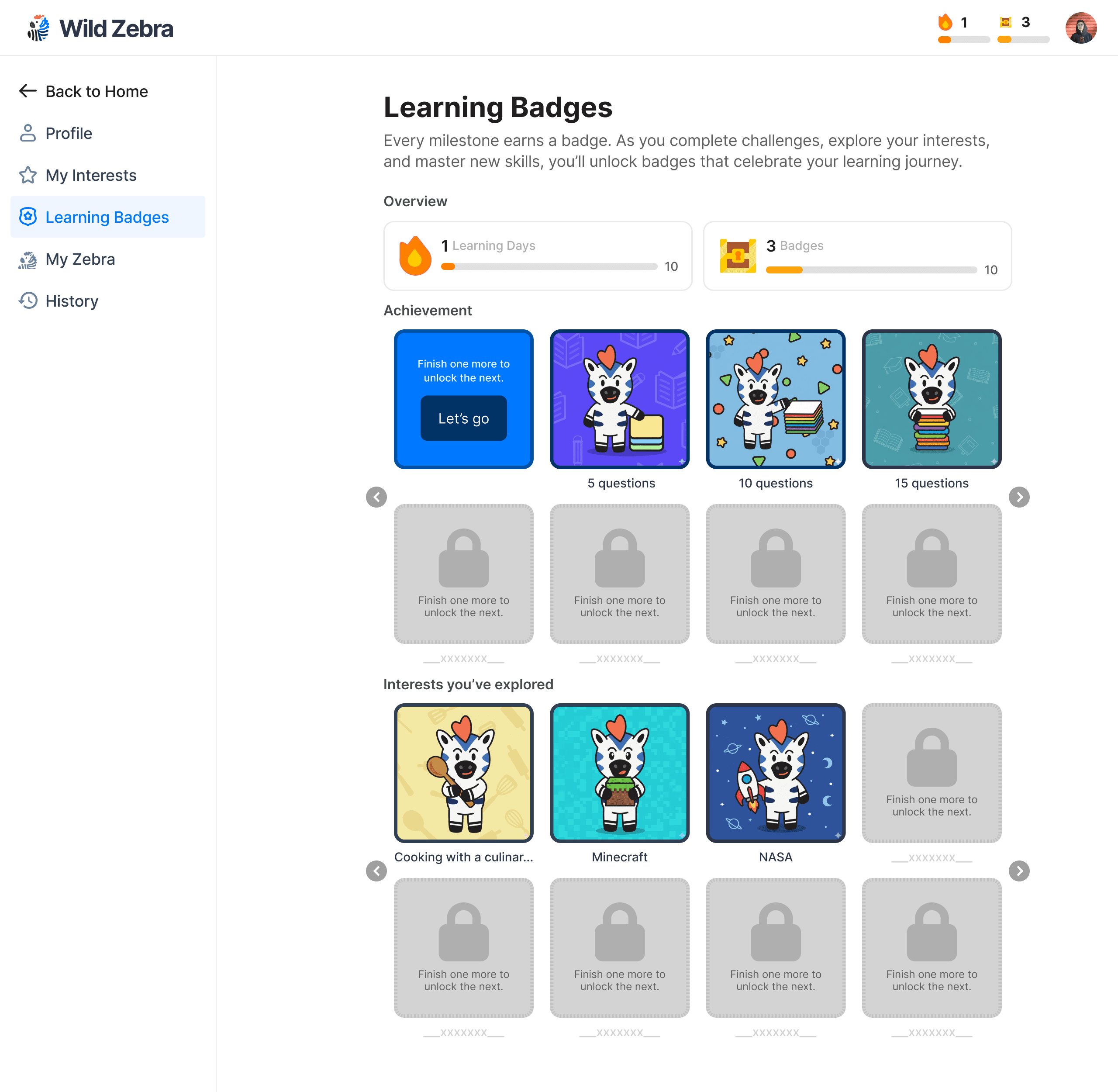
I explored how badges could make that progress more visible and personal. My role was to define how badges were earned, map the experience, and improve the prompts so the generated images felt consistent with our mascot and product.
The idea initially sounded simple: generate a badge based on something the student likes.
During one feedback conversation, a student asked for “a badge where the zebra is playing football.” That made sense, but it also raised a bigger question: What did the student do to earn it?
I didn’t want the badge to be a random image that appeared after a few questions. It still needed to represent something real about the student’s learning.
I kept coming back to one rule:
The learning system decides what the student earned. AI decides how it looks.
A student who mastered Fractions might receive a Space Fractions Badge, while another student could receive a Soccer Fractions Badge. The visuals were different, but the achievement was the same.
LEARNING SIGNAL
Mastery Engine
or
Practice Activity
REWARD LOGIC
Mastery Badge
or
Achievement Badge
VISUAL INPUTS
Interest Theme
Visual Family
Prop + Expression
Background + Pattern
PROMPT GUARDRAILS
Zebi Brand Lock
Composition Rules
Age Appropriateness
No Text or Symbols
GENERATED OUTPUT
Personalized Badge
PRODUCT EXPERIENCE
Unlock Moment
Progress Dashboard
Badge Collection
I separated the badges into two groups.
Mastery Badges represented something the student had learned, such as mastering Fractions or a Reading Comprehension skill. These badges had to come from the mastery system.
Achievement Badges recognized effort and participation, such as completing 20 questions, finishing a first assignment, or maintaining a learning streak.
This helped us avoid treating question volume as proof of mastery. It also made the unlock logic easier for students and the product team to understand.
Mastery Badge
Achievement Badge
Purpose
Represent actual learning
Recognize effort and participation
Data source
Mastery engine
Practice activity counters
Triggered by
Mastering a standard, topic, or reading skill
Completing questions, assignments, or learning streaks
Examples
Fractions, Main Idea, Geometry, Vocabulary
First assignment, 20 questions, 3-day streak
Cannot be triggered by
Question quantity alone
Mastery status
Personalization
Learning achievement + interest skin
Milestone + interest skin
Where it appears
Unlock moment, Progress Dashboard, Learning Tree
Unlock moment, Progress Dashboard, Badge Collection
I used the failed generations to understand what the prompt needed to control. A badge could be cute, but it still had to work as a learning reward.
Three issues kept showing up:
The visuals were not always meaningful to students.
When the model added text on the badge, it was often misspelled or hard to read.
Without text, the zebra’s facial expression became the most engaging part of the reward.
So the prompt shifted away from describing a finished badge label and toward controlling the mascot, emotion, action, and context. The interface would carry the written achievement; the image only needed to feel rewarding and instantly recognizable.


I mapped where the badge should appear across the product:
Practice → Achievement detected → Badge generated → Unlock moment → Collection
The badge appeared after the learning feedback, so students first understood what they had accomplished and then saw what they had earned.
To review the idea with product, engineering, and education stakeholders, I used a journey map, badge-trigger matrix, prompt comparisons, and product mockups. These helped us discuss the actual decisions behind the interface, including what counted as mastery, which parts could be personalized, and how badges connected to the broader progression experience.

The project started as an idea for generating cute rewards. It became a clearer framework for:
Connecting badges to real learning events
Separating mastery from participation
Generating different themes from one prompt structure
Reviewing outputs using consistent criteria
Connecting the unlock moment to progress and badge collection
The most important lesson was that AI worked best in the part of the system where variation added delight. It could personalize how an achievement was expressed, but it shouldn’t decide what the student had achieved.