From AI Tutor Data to Teacher Action
I designed Wild Zebra’s teacher experience from the ground up, helping educators manage assignments, monitor student progress, and understand how students learn through an AI tutor.
project overview
Wild Zebra’s AI tutor captures more than whether a student answered correctly. It also sees how students approach problems, what kind of support they need, where their reasoning breaks down, and how their understanding changes over time.
I designed the teacher-facing experience that transforms this complex learning data into workflows educators can actually use—from managing classes and creating assignments to identifying struggling students and reviewing individual learning patterns.
my role
Lead Product Designer
product
K2–K10 AI learning platform
users
Teachers, admins & students
scope
Strategy, UX, IA, prototyping
the challenge
AI generated more data than teachers could use.
Each student interaction produced a growing amount of information: answers, tutor conversations, hints, whiteboard work, time spent, mastery changes, and behavioral signals.
But more data did not automatically create more understanding. Teachers still needed to quickly answer a few practical questions:
Which students need my attention?
What are they struggling with—and why?
Are they learning independently or relying heavily on support?
What should I assign or reinforce next?
How is the class progressing across standards?
The challenge was to organize AI-generated observations without overwhelming teachers or reducing student learning to a single score. I structured the experience around teacher decisions rather than around the data generated by the system.
Understand the class
Class-level progress and assignment status
Find students who need support
Notifications, behavior signals, and progress changes
Diagnose a learning problem
Question-level reasoning and conversation insights
Plan the next activity
Personalized and teacher-selected assignments
Manage the classroom
Classes, students, invitations, and role controls
Step 1 — Capture
AI interaction data
Students work with the AI tutor; every prompt, attempt, and correction is logged as raw interaction data.
Step 2 — Interpret
Learning signals
The system distills raw activity into signals teachers can trust — misconceptions, struggle patterns, and progress trends.
Step 3 — Decide
Teacher decisions
The dashboard surfaces who needs attention and why, so teachers decide where to intervene in minutes, not hours.
Step 4 — Act
Classroom action
Interventions happen in the classroom — regrouping, reteaching, or one-on-one support — and feed new data back into the loop.
information architecture
Designing around the teacher’s decision loop: monitor the class → identify a student → understand the problem → take action → track what changes.
Teachers needed to move between a quick classroom overview and detailed evidence without reading every student conversation. I organized the experience into three levels—class, student, and question—so they could start with patterns and only go deeper when something required attention.
Progressive disclosure was especially important. AI analysis could become highly detailed, but most teachers did not need every signal at once. The interface surfaced the most relevant pattern first and kept the supporting evidence available underneath.
Class — participation, progress, assignments, alerts
Where should I focus?
Student — mastery, learning trajectory, behavior patterns
What does this student need?
Question — response, tutor conversation, errors, scaffolding
Why are they struggling?

assignments
Balancing personalization with teacher control.
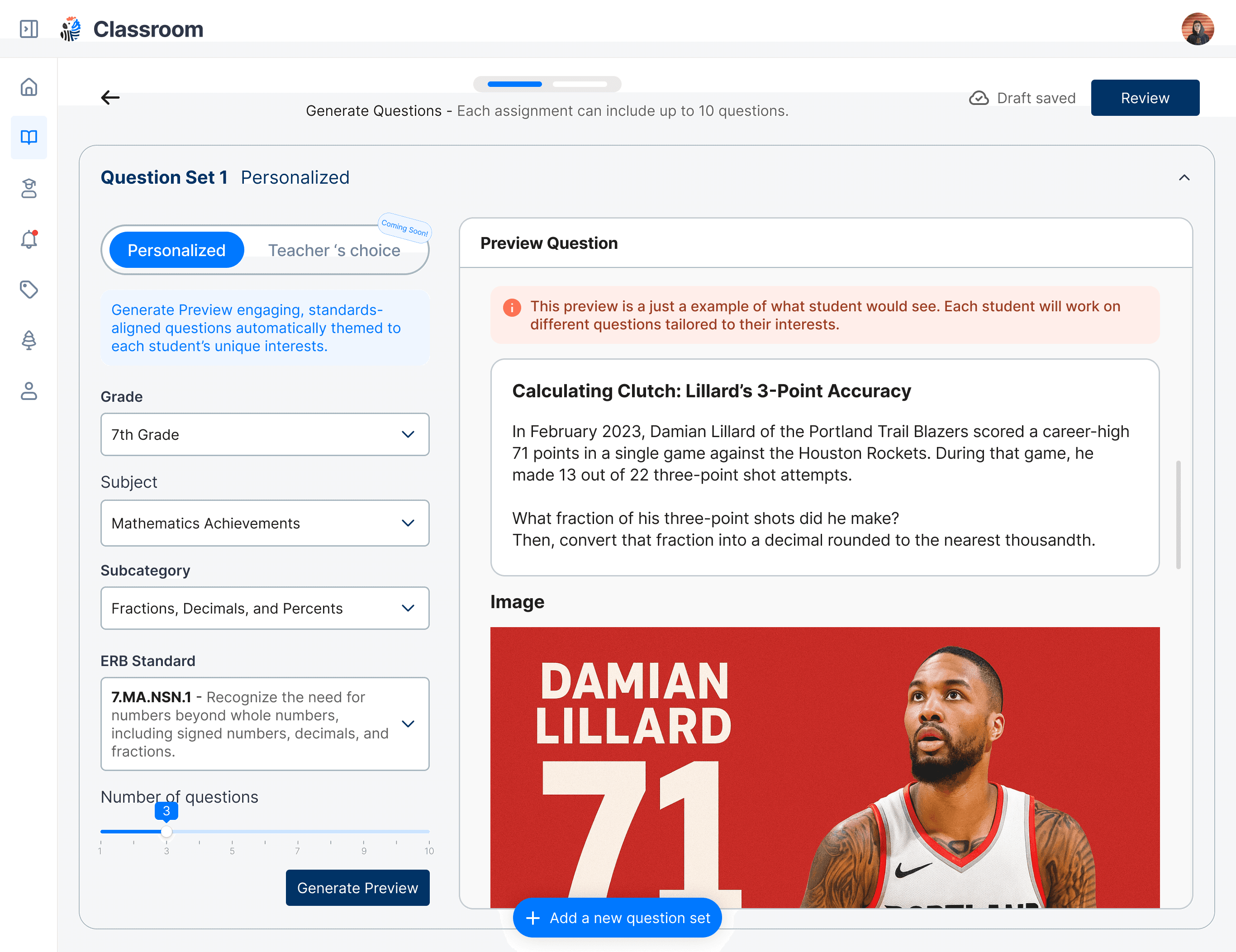
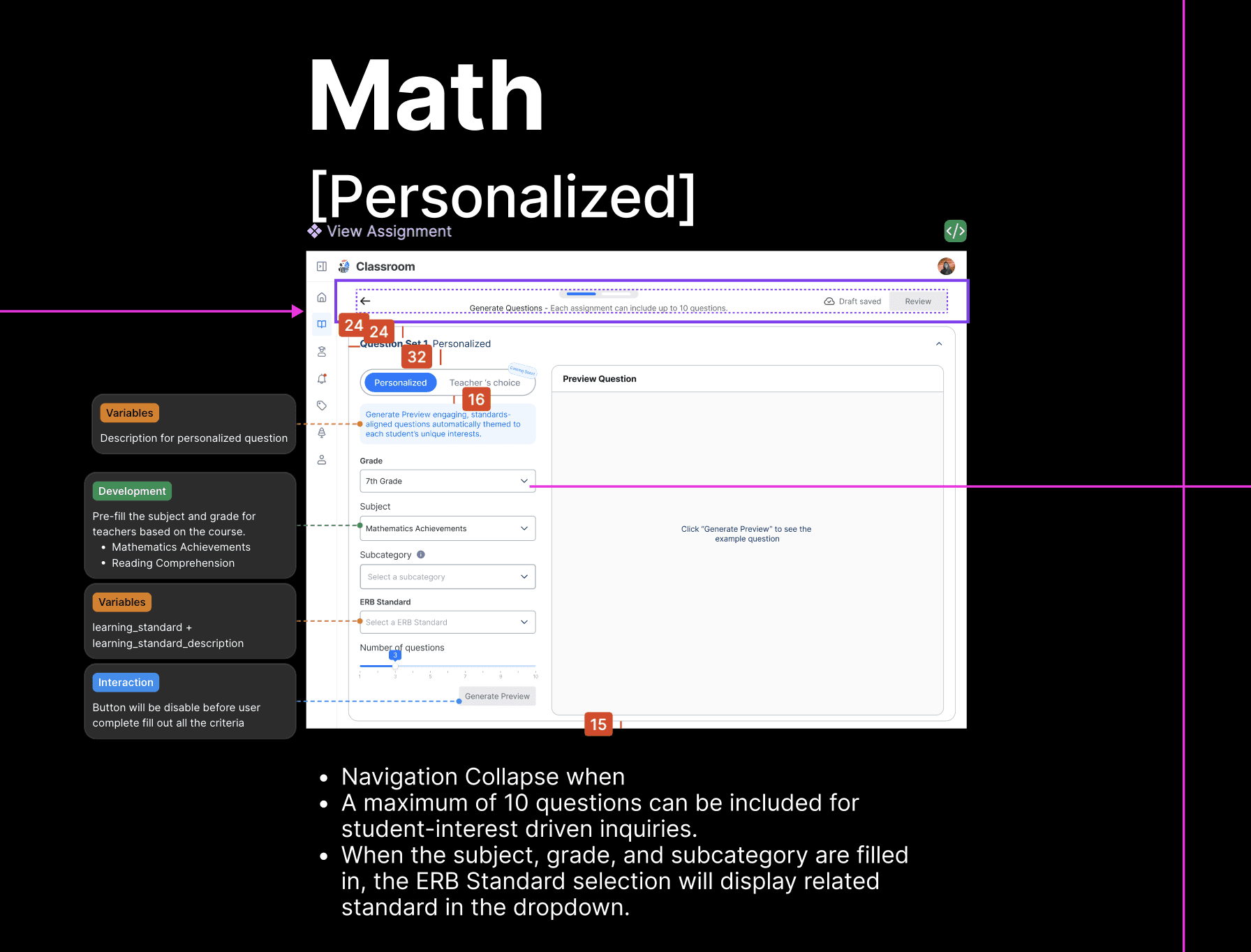
AI could personalize practice for every student, but teachers still needed control over what was being taught. I designed two assignment paths and brought them into the same workflow:
Personalized: Wild Zebra selects questions based on each student’s current learning needs.
Teacher’s Choice: Teachers choose the subject, standards, and content students should practice.
Teachers could use AI to reduce manual work while still reviewing every generated question before publishing. Assignments could be saved as drafts, previewed with a Generate Preview step, and tracked through clear states such as Not Started, In Progress, and Completed.
The real design question was not making assignment creation faster—it was how much control teachers should give the AI. The system became more efficient without asking teachers to blindly trust the output.



ai insights
Making AI insights explainable.
AI could generate a large number of observations, but showing every signal would make the dashboard harder to understand. I defined which insights should be surfaced first, which needed supporting evidence, and which should remain available only when teachers wanted to investigate further. Each question-level insight was layered:
Primary signal — student needs support
Explanation — where the reasoning broke down
Evidence — answer, tutor conversation, whiteboard work
Teacher action — review or assign additional practice
Instead of only showing that a student answered incorrectly, the dashboard could explain that the student understood the concept but needed multiple hints to translate the problem into an equation. Every insight linked back to the student’s actual response, tutor conversation, and problem-solving process—evidence teachers could check, not an opaque AI judgment.
Teachers could also receive notifications when students requested help or encountered a problem, allowing the dashboard to support both retrospective analysis and timely intervention.


system & operations
Building for real classroom operations.
I also designed the supporting workflows required for the dashboard to work in real schools: class creation, roster management, teacher approval, administrator permissions, and student help notifications. When a student raised their hand inside the AI tutor, the notification connected the teacher back to the specific question and conversation.

outcome
As the founding designer, I worked closely with teachers, engineers, and the CEO to define the product while it was being built. I used prototypes to clarify workflows, reviewed implementation details with engineering, and kept refining the experience based on feedback from school pilots.
Teacher feedback led to changes such as clearer assignment states, question previews, text-to-speech, math input tools, and deeper visibility into student reasoning.
The student and teacher platforms were designed and shipped within six months, supporting an AI learning experience used by more than 10,000 students.
